1
2
3
4
5
6
7
8
9
10
11
12
13
14
15
16
17
18
19
20
21
22
23
24
25
26
27
28
29
30
31
32
33
34
35
36
37
38
39
40
41
42
43
44
45
46
47
48
49
50
51
52
53
54
55
56
57
58
59
60
61
62
63
64
65
66
67
68
69
70
71
72
73
74
75
76
77
78
79
80
81
82
83
84
85
86
87
88
89
90
91
92
93
94
95
96
97
98
99
100
101
102
103
104
105
106
107
108
109
110
111
112
113
114
115
116
117
118
119
120
121
122
123
124
125
126
127
128
129
130
131
132
|
# How to test a PR
## Introduction
At AzerothCore we care about game quality and stability. Because of this, **we do not push changes directly to the master branch**. Instead, whenever introducing a new change, we create a new [Pull Request](https://help.github.com/articles/about-pull-requests/) (often shortened in PR).
This allow us to properly **review and test** any change before it gets into production environments. Everyone who is able to install AzerothCore is also able to contribute by testing PRs. This guide will explain how to do it.
The more users help us with testing the PRs, the better will be our development activity in terms of speed and quality.
## What PRs need to be tested?
We label as [**Waiting to be tested**](https://github.com/azerothcore/azerothcore-wotlk/pulls?q=is%3Apr+is%3Aopen+label%3A%22Waiting+to+be+tested%22) all PRs that have already been completed by the author and had their code reviewed.
Clicking on the label above will show you the list of all PRs that need to be tested in order to get to the `master` branch.
## What do I need before testing a PR?
You need to:
- have AzerothCore installed in your system (either using the [traditional setup](Installation) or the [Docker setup](Install-with-Docker)).
- have a GitHub account, you can [register one here](https://github.com/join) for free.
### What if the PR has only DB changes?
Some PRs have only database changes (no C++ changes). If that's the case, there is a [simplified procedure to test such changes](How-to-test-DB-only-changes).
If you're not sure, just keep reading here and do the traditional PR test which will work for all kind of PRs.
### Notes who cloned a fork of AzerothCore instead of the main repo:
It is typical to create and clone your own fork of AzerothCore if you are also a developer.
If that is your case, then you have to
- add the main AzerothCore remote using:
```
git remote add upstream https://github.com/azerothcore/azerothcore-wotlk.git
```
- replace `origin` with `upstream` in all commands listed below
## Get the PR code to be tested
- Open a terminal and move to the directory of your AzerothCore sources, for example using `cd azerothcore-wotlk`.

- Here we assume that you are starting from a clean, updated `master` branch. You can verify which branch you are in by typing `git checkout`. If you are not in master already, go back to master using `git checkout master`. While you're here, you can also `git pull` to make sure you have the latest master. And remember, **never add custom changes to the master branch** (always create a new, separate branch if you have to).
- Check the ID of the PR that you want to test, it will appear in the URL and title of the PR. For example the ID of this PR is **1383**: [https://github.com/azerothcore/azerothcore-wotlk/pull/1383](https://github.com/azerothcore/azerothcore-wotlk/pull/1383)

- Now you need to run the following commands by replacing "XXXX" with the ID of the PR that you want to test:
```git checkout -b pr-XXXX```
```git pull origin pull/XXXX/head```
The commands above will create a new local branch called `pr-XXXX` which will contain all the changes that need to be tested.
The terminal might prompt an editor (usually `nano`) that asks to save the merge commit message. Just save the changes and exit the editor. If the editor is `nano`, you can do it by simply using `CTRL+O` and `ENTER` to save then `CTRL+X` to exit.
## Update your local server to apply the changes
Now you simply need to update your local server with the new changes. The procedure is analogue to a normal server update.
Basically you need to **recompile your sources** and **update the DB**.
### Using traditional setup
If you are using the traditional setup, you have to recompile following the steps of the [3) Compiling](Installation#3-compiling) from the main setup guide.
You also need to update your DB. You can use the DB assembler to do that, but usually it's quicker to just manually importing the pending sql file(s) that the PR includes. Such file(s) are located under `data/sql/updates/pending_db_*`.
**Tip**: typically a PR consists of one new world update file located under `data/sql/updates/pending_db_world`. You can check which files have been added to spot any added sql files going to the "Files changed" tab of the PR page:

Then start the server just the way you always do.
### Using Docker setup
If you are using the Docker setup, you can simply trigger the recompilation by running:
```./bin/acore-docker-build```
then to launch the server you have to destroy and recreate the containers using `docker-compose down` and `docker-compose up`.
**Note**: this will also automatically update your DB.
-----
To make sure you are correctly running your server with the PR, check the date and branch name in the output of the `server info` command. They should match with the PR.
Now log in game and do your tests!
## What needs to be tested?
Instructions about what needs to be tested in the scope of a PR should be provided by the PR's author in the PR description. If that is not the case, feel free to leave a comment in the PR description asking for testing istructions.
For advanced users: you can also have a look at what has actually been changed in the PR and decide yourself what to test. Sometimes it's good to have a different point of view! Just make sure you describe what you have tested in your report.
## Reporting your test results
It is important to report your test results by leaving a comment **in the PR page**.
You should write:
- what you have tested
- do the things that you've tested work as intented?
- sometimes you may also want to specify how things worked **before** and **after** the PR
- please insert as many details as possible
- you can also insert screenshot or videos
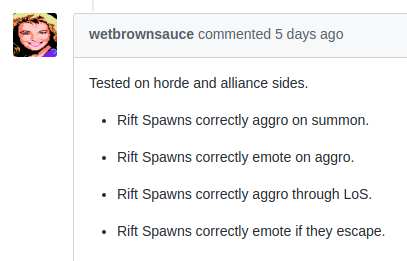
## Examples of good testing reports




|
