
diff options
| author | Francesco Borzì <borzifrancesco@gmail.com> | 2021-08-15 17:55:02 +0200 |
|---|---|---|
| committer | GitHub <noreply@github.com> | 2021-08-15 17:55:02 +0200 |
| commit | fcd592283e077d0ae66ba5b7205454bcc31971e4 (patch) | |
| tree | 8cea14946111464d98ee07ec286937dfb27bccea | |
| parent | 2dde1c1d03350491768a056c71a91688a108e25f (diff) | |
| download | wiki-fcd592283e077d0ae66ba5b7205454bcc31971e4.tar.gz wiki-fcd592283e077d0ae66ba5b7205454bcc31971e4.tar.bz2 wiki-fcd592283e077d0ae66ba5b7205454bcc31971e4.zip | |
docs: new way of creating PRs (#619)
| -rw-r--r-- | _includes/azerothcore/sidebar.html | 1 | ||||
| -rw-r--r-- | assets/images/pr-tutorial/update-fork-1.png | bin | 0 -> 67635 bytes | |||
| -rw-r--r-- | assets/images/pr-tutorial/update-fork-2.png | bin | 0 -> 15202 bytes | |||
| -rw-r--r-- | assets/images/pr-tutorial/web-create-new-branch.png | bin | 0 -> 31718 bytes | |||
| -rw-r--r-- | assets/images/pr-tutorial/web-create-new-file-1.png | bin | 0 -> 33147 bytes | |||
| -rw-r--r-- | assets/images/pr-tutorial/web-create-new-file-2.png | bin | 0 -> 37657 bytes | |||
| -rw-r--r-- | assets/images/pr-tutorial/web-rev-generator.png | bin | 0 -> 38104 bytes | |||
| -rw-r--r-- | docs/contribute.md | 1 | ||||
| -rw-r--r-- | docs/getting-started.md | 2 | ||||
| -rw-r--r-- | docs/how-to-create-a-db-pr.md | 126 | ||||
| -rw-r--r-- | docs/how-to-create-a-pr.md | 41 |


11 files changed, 170 insertions, 1 deletions
diff --git a/_includes/azerothcore/sidebar.html b/_includes/azerothcore/sidebar.html index f696451..63debd7 100644 --- a/_includes/azerothcore/sidebar.html +++ b/_includes/azerothcore/sidebar.html @@ -42,6 +42,7 @@ <ul> <li><a href="/wiki/contribute">How to contribute </a></li> <li><a href="/wiki/how-to-create-a-pr">How to create a PR</a></li> + <li><a href="/wiki/how-to-create-a-db-pr">How to create an SQL PR via GitHub</a></li> <li><a href="/wiki/how-to-test-a-pr">How to test a PR</a></li> <li><a href="/wiki/how-to-test-db-only-changes">How to test DB-only changes</a></li> <li><a href="/wiki/how-to-document-code">How to document your code</a></li> diff --git a/assets/images/pr-tutorial/update-fork-1.png b/assets/images/pr-tutorial/update-fork-1.png Binary files differnew file mode 100644 index 0000000..95150cd --- /dev/null +++ b/assets/images/pr-tutorial/update-fork-1.png diff --git a/assets/images/pr-tutorial/update-fork-2.png b/assets/images/pr-tutorial/update-fork-2.png Binary files differnew file mode 100644 index 0000000..2540ec0 --- /dev/null +++ b/assets/images/pr-tutorial/update-fork-2.png diff --git a/assets/images/pr-tutorial/web-create-new-branch.png b/assets/images/pr-tutorial/web-create-new-branch.png Binary files differnew file mode 100644 index 0000000..13e9d5e --- /dev/null +++ b/assets/images/pr-tutorial/web-create-new-branch.png diff --git a/assets/images/pr-tutorial/web-create-new-file-1.png b/assets/images/pr-tutorial/web-create-new-file-1.png Binary files differnew file mode 100644 index 0000000..59f2a41 --- /dev/null +++ b/assets/images/pr-tutorial/web-create-new-file-1.png diff --git a/assets/images/pr-tutorial/web-create-new-file-2.png b/assets/images/pr-tutorial/web-create-new-file-2.png Binary files differnew file mode 100644 index 0000000..14a50d4 --- /dev/null +++ b/assets/images/pr-tutorial/web-create-new-file-2.png diff --git a/assets/images/pr-tutorial/web-rev-generator.png b/assets/images/pr-tutorial/web-rev-generator.png Binary files differnew file mode 100644 index 0000000..9fe392c --- /dev/null +++ b/assets/images/pr-tutorial/web-rev-generator.png diff --git a/docs/contribute.md b/docs/contribute.md index 830875d..9cf2344 100644 --- a/docs/contribute.md +++ b/docs/contribute.md @@ -48,6 +48,7 @@ If **(and only if)** the bug hasn't been reported yet, you can [open an issue](h ## How to create a Pull Request - Read [How to create a PR](How-to-create-a-PR). +- Alternatively, you can also check [this simpler tutorial](How-to-create-a-DB-PR) about opening PRs containing SQL code via GitHub ### Giving credit to the author of code diff --git a/docs/getting-started.md b/docs/getting-started.md index acc9eab..b465bf5 100644 --- a/docs/getting-started.md +++ b/docs/getting-started.md @@ -171,7 +171,7 @@ if you understand how basic statements such as `SELECT`, `UPDATE`, `INSERT` and You can submit your improvement via PR. Read this guide: -- [How to create a Pull Request (PR)](https://www.azerothcore.org/wiki/How-to-create-a-PR) +- [How to create a Pull Request (PR)](https://www.azerothcore.org/wiki/how-to-create-a-pr) ## Start contributing! diff --git a/docs/how-to-create-a-db-pr.md b/docs/how-to-create-a-db-pr.md new file mode 100644 index 0000000..861488b --- /dev/null +++ b/docs/how-to-create-a-db-pr.md @@ -0,0 +1,126 @@ +--- +redirect_from: "/How-to-create-a-DB-PR" +--- + +# How to create a DB PR via GitHub + +This is a simplified guide to easily create PRs containing DB fixes (SQL code) without bothering with the terminal, +an easier alternative to the [traditional way of creating PRs](https://www.azerothcore.org/wiki/how-to-create-a-pr). +If you want to submit C++ or other non-SQL kind of fixes, please follow the other guide. + +## Do only ONCE: create and clone your AzerothCore fork + +You need to be signed on [github.com](https://github.com/). If you don't have an account yet, create one. + +Open the [AzerothCore repository](https://github.com/azerothcore/azerothcore-wotlk) +and create a fork of it by clicking in the top-right "Fork" button: + +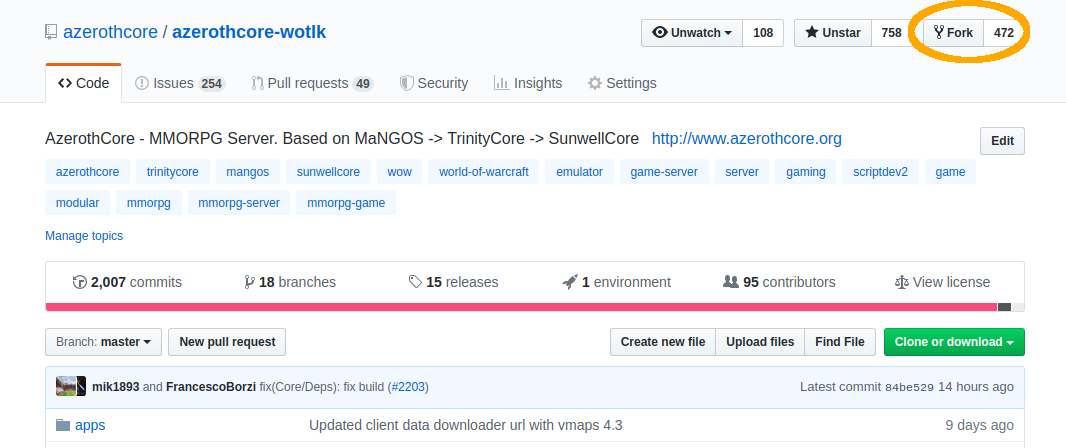 + +## Creating a new PR + +### 1. Update your fork on GitHub + +Open your browser and navigate to your fork on GitHub (change `YourUsername` with your actual GitHub username): + +**https://github.com/YourUsername/azerothcore-wotlk** + +If your `master` branch is not up to date with latest AzerothCore, you'll see something like: + +`This branch is XX commits behind azerothcore:master` + +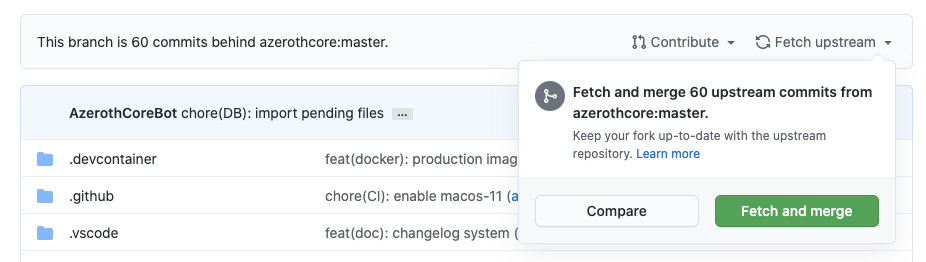 + +to update it, click on **Fetch upstream** and then **Fetch and merge**. + +As a result, your fork's `master` branch should say: + +`This branch is even with azerothcore:master` + +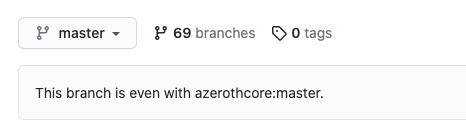 + + +### 2. Create a new branch + +Make sure you have the `master` branch currently selected, click on the branches dropdown and create a new branch. + +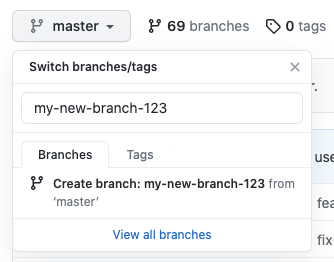 + +You can name your new branch the way you want (typically something related to your fix), +just make sure you haven't used that name before and that you are creating the new branch by copying the master branch. + +You should see a message like **Create branch my-new-branch-123 from master**. + +After you create the new branch, make sure you **keep that one selected**. + +### 3. Navigate to the pending_db_world folder + +You now need to navigate inside the `data/sql/updates/pending_db_world` folder of your fork. + +You can either do it manually by clicking on the `data` folder, then `sql`, `updates`, `pending_db_world`; + +...or you can just open this URL (change `YourUsername` with your actual GitHub username): + +**https://github.com/YourUsername/azerothcore-wotlk/tree/my-new-branch-123/data/sql/updates/pending_db_world** + +### 4. Generate a new update file rev + +In a new browser tab, open [azerothcore.org/pages/rev-generator](https://www.azerothcore.org/pages/rev-generator/). + + + + +This will give you: + +- the name of the file you need to create which will contain your SQL code +- the *SQL version code* (an `INSERT INTO` query) which you will need to add at the top of the new SQL file that you will submit + +**Note**: they should always go together and you should always have a new rev for every PR you send. +If you need to get a new rev, just refresh the page or click "Generate new". + +Copy them somewhere or keep that browser tab open. + +### 5. Create and commit a new file + +Back on GitHub, from the `pending_db_world` folder, click **Add file** and then **Create new file**: + + + +Now you need to: + +- set the file name as the one you generated in the step 4 +- add the SQL version code that you generated in the step 4 + +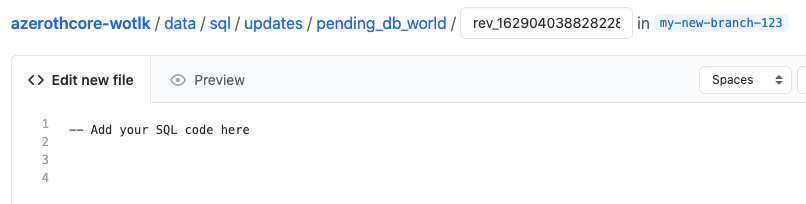 + +Now scroll down the page, you'll need to: + +1. fill out the commit message, we use the [Conventional Commits format](https://www.conventionalcommits.org/), + for example `fix(DB/Creature): some commit description here` +2. (optional) include some extra description +3. make sure that "Commit directly to the `your-new-branch-name`" is selected +4. Click **Commit new file** + +### 6. Open the PR + +Go back to the [main AzerothCore repository](https://github.com/azerothcore/azerothcore-wotlk), +you will notice that GitHub is smart enough to realize that you are about to open a PR +and shows this nice light-yellow box: + +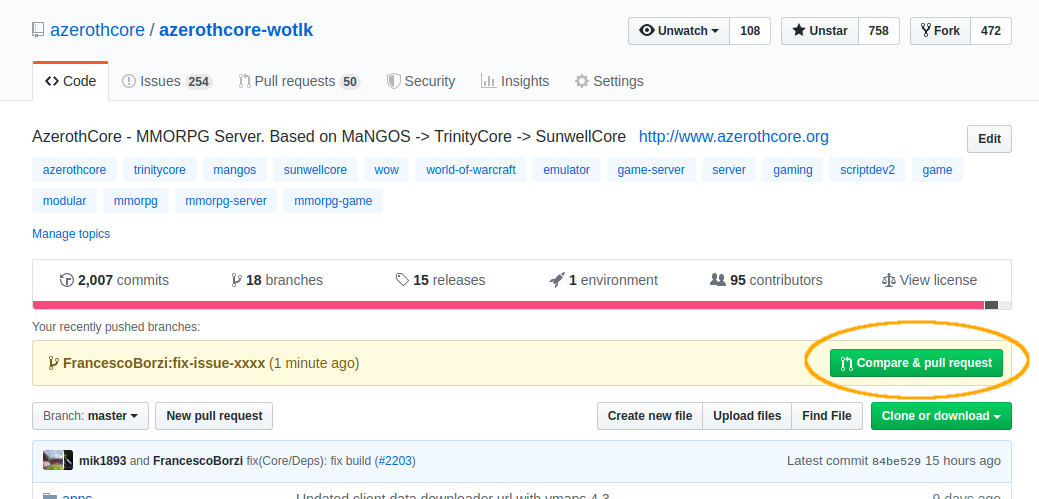 + +click on the "Compare & pull request" green button (located on the right). + +Now fill the PR template following the instructions that will appear in the screen, +do not forget to add the **testing instructions** so people can be able to test your PR and it can be merged: + +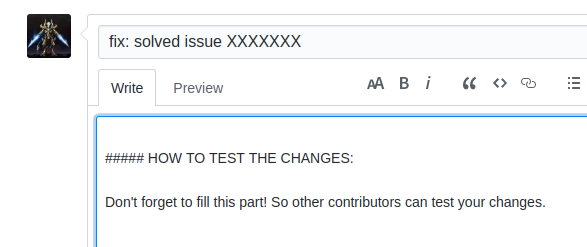 + +It's also a good practice to check the "File changes" tab to see that everything is in place as you expect: + + + +**NOTE:** We do not respond well to leechers! If your fix comes from another organization or person +you should ALWAYS give credit to the original author and commit. + +That's it!
\ No newline at end of file diff --git a/docs/how-to-create-a-pr.md b/docs/how-to-create-a-pr.md index 7f1f3cd..41a70ad 100644 --- a/docs/how-to-create-a-pr.md +++ b/docs/how-to-create-a-pr.md @@ -4,6 +4,12 @@ redirect_from: "/How-to-create-a-PR" # How to create a PR +This guide explains how to open PRs to submit any kind of fixes (C++, SQL, etc...). + +If you happen to submit only DB fixes, you might give it a try to our new [simplified way of opening a PR containing SQL code]([traditional way of creating PRs](https://www.azerothcore.org/wiki/how-to-create-a-db-pr). + +## Do only ONCE: create and clone your AzerothCore fork + ### 1. Create a fork of AzerothCore You need to be signed on [github.com](https://github.com/). If you don't have an account yet, create one. @@ -39,6 +45,37 @@ cd azerothcore-wotlk 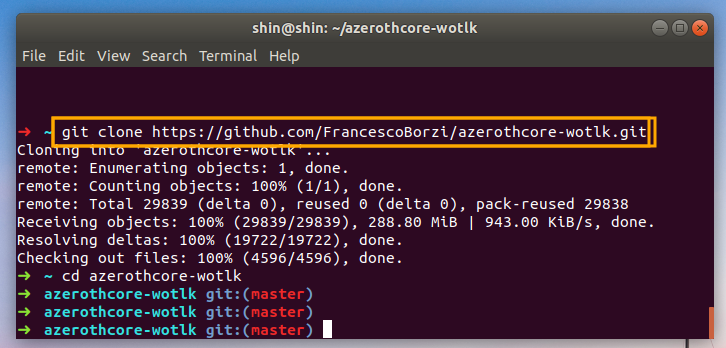 +## Creating a new PR + +### 1. Update your fork on GitHub + +Open your browser and navigate to your fork on GitHub (change `YourUsername` with your actual GitHub username): + +**https://github.com/YourUsername/azerothcore-wotlk** + +If your `master` branch is not up to date with latest AzerothCore, you'll see something like: + +`This branch is XX commits behind azerothcore:master` + + + +to update it, click on **Fetch upstream** and then **Fetch and merge**. + +As a result, your fork's `master` branch should say: + +`This branch is even with azerothcore:master` + + + +### 2. Update your local clone + +In the previous step you just updated your *remote* fork, but you have to sync your local clone as well. + +Open your terminal inside the `azerothcore-wotlk` directory and run: + +``` +git checkout master; git pull +``` ### 3. Create a new branch @@ -116,6 +153,8 @@ git add data/sql/updates/pending_db_world/rev_XXXXXXXXXXXX.sql ### 6. Commit & Push your changes +#### Do only ONCE: git config + First of all make sure to use the AC commit template (this should only be necessary once): ``` git config --local commit.template ".git_commit_template.txt" @@ -126,6 +165,8 @@ When you will write your commit message, it will use the default text editor `Vi git config --global core.editor "nano" ``` +#### Git commit + Then commit your changes by typing: ``` git commit |


