
diff options
| author | Kitzunu <24550914+Kitzunu@users.noreply.github.com> | 2021-06-12 14:50:58 +0200 |
|---|---|---|
| committer | GitHub <noreply@github.com> | 2021-06-12 14:50:58 +0200 |
| commit | f309cf79bbb032a0686b7d04feb8fec18e600a84 (patch) | |
| tree | 9ea7db08f0698ec9af213941307c83246c7b68a3 /docs/How-to-test-DB-only-changes.md | |
| parent | b2610fad21012673061f5af786b022c96625cc26 (diff) | |
| download | wiki-f309cf79bbb032a0686b7d04feb8fec18e600a84.tar.gz wiki-f309cf79bbb032a0686b7d04feb8fec18e600a84.tar.bz2 wiki-f309cf79bbb032a0686b7d04feb8fec18e600a84.zip | |
chore: file naming standard (#517)
* A
* file naming standard
Fixes #491
* Revert "A"
This reverts commit 1c225fed753554098069597a2bbcbe08213b76a1.
* rename
* Revert "rename"
This reverts commit 65fd916faf8530ce258cc2b475c93971468680fe.
* Revert "file naming standard"
This reverts commit 6ca5a703a9e9d59f9c773029e4c04bfd012b6abb.
* bye
* Hi
* Create the-staging-branch.md
* 1
* Delete how-to-create-a-PR.md
* Create how-to-create-a-pr.md
* werafgt
* Update the-modular-structure.md
* wef
Diffstat (limited to 'docs/How-to-test-DB-only-changes.md')
| -rw-r--r-- | docs/How-to-test-DB-only-changes.md | 63 |
1 files changed, 0 insertions, 63 deletions
diff --git a/docs/How-to-test-DB-only-changes.md b/docs/How-to-test-DB-only-changes.md deleted file mode 100644 index 3e88294..0000000 --- a/docs/How-to-test-DB-only-changes.md +++ /dev/null @@ -1,63 +0,0 @@ -## Introduction - -The main guide about [How to test a PR](How-to-test-a-PR) will work for all kind of PRs. - -However it is common to have PRs that only make changes to the database (typically the `world` database). - -For those PRs there is a simpler way to test them, which will be explained in this page. - -**Tip**: The complete list of PRs that need to be tested is available [here](https://github.com/azerothcore/azerothcore-wotlk/pulls?q=is%3Apr+is%3Aopen+label%3A%22Waiting+to+be+tested%22). - -## Requirements - -This tutorial assumes that you: - -- have a **recent** version of AzerothCore installed in your system (either using the [traditional setup](Installation) or the [Docker setup](Install-with-Docker)). We recommend using latest `master`. -- have a GitHub account, you can [register one here](https://github.com/join) for free. -- have a database client such as [HeidiSQL](https://www.heidisql.com/), Navicat or similar. - -## Check if a PR has only DB changes - -Open the PR page and click on the "File Changes" tab: - - - -- If you see `*.cpp`, `*.h` file changes, then follow [this guide](How-to-test-a-PR) instead. - -- If you only see `*.sql` changes, keep reading. - -## Import the changes to your Database - -The PR will have some sql files (typically only one) inside the folders `pending_db_xxxxx` where `xxxxx` is the name of the database (typically `world`). - -Basically you just need to import those changes to the corresponding database (typically `acore_world`). - -To do that, click on the button "View file" under the "File changes" tab of the PR page. You can either download the whole file or just manually copy all the SQL code. - -Then open your database client (for example HeidiSQL), select the right database (e.g. `acore_world`) and execute the SQL code. - -For example, on HeidiSQL **first select** the database from the left column, then open the "Query" tab, paste the SQL code there and press F9 to execute it: - -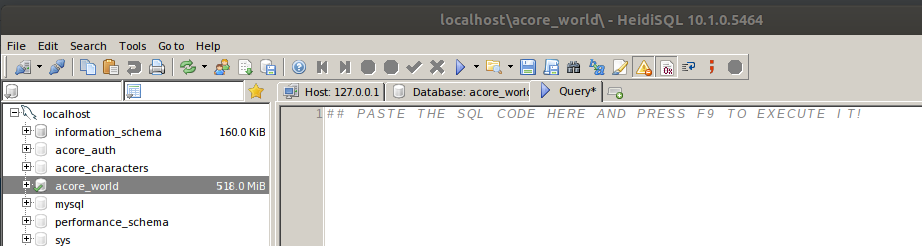 - -## Reflect the changes in game - -A quick way to make your server loading the new changes is just by restarting the `worldserver` process. - -**Tip**: If you are using AC with Docker, you can simply restart your database container using `docker-compose restart ac-worldserver` - -**Advanced tip**: Sometimes the changes only affect tables that can be reloaded directly in game using the command `.reload tablename` - -Now you can test the changes and post your results as a comment on the github page of the PR! - -## Returning to a clean state - -After you test the changes, you need to return in a clean state (as you were before applying those changes to your DB). - -- On a **traditional setup**, you can delete your `acore_world` database and use the DB assembler to generate a new one - -- On a **docker setup**, you can destroy and recreate your containers using `docker-compose down` and `docker-compose up`. - -## Reports - -For instructions about what needs to be tested, how to report your test results and examples of other reports, please read from [this part](How-to-test-a-PR#what-needs-to-be-tested) of the main PR guide.
\ No newline at end of file |