
diff options
| author | Yehonal <yehonal.azeroth@gmail.com> | 2019-02-17 21:34:28 +0100 |
|---|---|---|
| committer | Yehonal <yehonal.azeroth@gmail.com> | 2019-02-17 21:34:28 +0100 |
| commit | a3d359e1cc4f40328f898653a5cc3b9711a522e6 (patch) | |
| tree | 48d879cbdbf5e78a72ca686912ca4ac361c929c7 /docs/Install-with-Docker.md | |
| parent | b781501462339649eac45d9d54f8dbbfb11a32db (diff) | |
| download | wiki-a3d359e1cc4f40328f898653a5cc3b9711a522e6.tar.gz wiki-a3d359e1cc4f40328f898653a5cc3b9711a522e6.tar.bz2 wiki-a3d359e1cc4f40328f898653a5cc3b9711a522e6.zip | |
Import all wiki page from old wiki (links to fix)
Diffstat (limited to 'docs/Install-with-Docker.md')
| -rw-r--r-- | docs/Install-with-Docker.md | 168 |
1 files changed, 168 insertions, 0 deletions
diff --git a/docs/Install-with-Docker.md b/docs/Install-with-Docker.md new file mode 100644 index 0000000..938a026 --- /dev/null +++ b/docs/Install-with-Docker.md @@ -0,0 +1,168 @@ +Welcome to the AzerothCore Docker guide! + +- [Introduction](#Introduction) +- [Setup guide](#Setup) +- [FAQ](#Faq) + +# Introduction + +Installing AzerothCore using Docker is a simplified procedure that has several benefits: + +- It's very easy! Docker will do all the dirty work for you. +- It can be done in all operating systems where Docker is available (including **Windows**, **GNU/Linux**, **macOS**) +- You don't need to install many dependencies (forget about _visual studio_, _cmake_, _mysql_, etc.. they are **NOT** required) +- Forget about platform-specific bugs. When using Docker, AzerothCore will always run in **Linux-mode**. +- There are many other [benefits when using Docker](https://www.google.com/search?q=docker+benefits) + +_AzerothCore running on macOS with Docker_ + + +_AzerothCore running on Windows 10 with Docker_ + + + +#### Memory usage + +The total amount of RAM when running all AzerothCore docker containers is **less than 2 GB** with no players online. + +This is an example of a fresh, empty AzerothCore server running with Docker on macOS: + +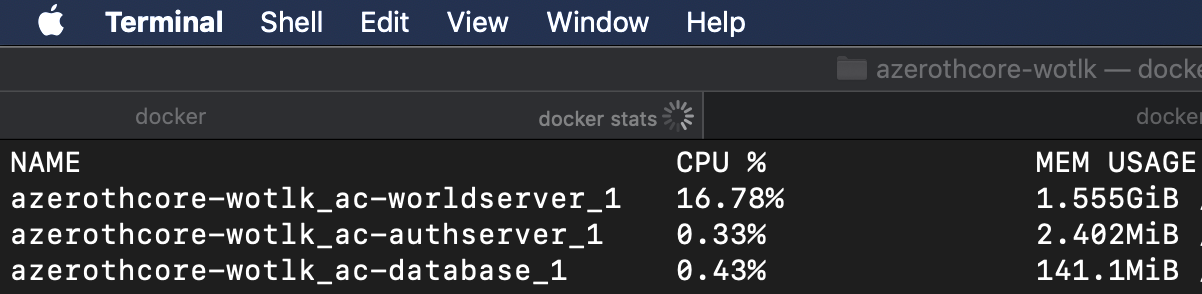 + +When used on GNU/Linux system, the amount of memory used by Docker is even less. + +#### Docker containers vs Virtual machines + +Usind Docker will have the same benefits as using virtual machines, but with much less overhead: + + + +# Setup + +## Software requirements + +The only requirements are [git](https://git-scm.com/download/) and Docker. + +#### New Operating Systems [recommended]: +- For GNU/Linux install [Docker](https://docs.docker.com/install/linux/docker-ce/ubuntu) and [Docker Compose](https://docs.docker.com/compose/install/) +- For macOS 10.12+ Sierra and newer version install [Docker Desktop for Mac](https://hub.docker.com/editions/community/docker-ce-desktop-mac) +- For Windows 10 install [Docker Desktop for Windows](https://hub.docker.com/editions/community/docker-ce-desktop-windows) + +#### Old Operating Systems [not tested]: +- For macOS older than 10.11 El Capitan and older install [Docker Toolbox for Mac](https://docs.docker.com/toolbox/toolbox_install_mac/) +- For Windows 7/8/8.1 install [Docker Toolbox for Windows](https://docs.docker.com/toolbox/toolbox_install_windows/) + + +Before going further, make sure you have `docker` and `docker-compose` installed in your system by typing in a terminal: + +``` +docker --version +``` +``` +docker-compose --version +``` + +You should see a similar output: + + + +**Note for Windows users**: you can use **git-bash** (the shell included in git) as a terminal. + +## Clone the AzerothCore repository + +You need to clone the AzerothCore repository (or use your own fork): + +``` +git clone https://github.com/azerothcore/azerothcore-wotlk.git +``` + +Now cd into the main directory using `cd azerothcore-wotlk`. **All commands will have to be run from this position**. + +## WoW Client Data files + +You also need to have the data files. Check the step "5) Download the data files" from the [installation guide](https://github.com/azerothcore/azerothcore-wotlk/wiki/Installation#5-download-the-data-files). + +Put your data files into the `docker/worldserver/data/` folder that is inside `azerothcore-wotlk`. + +## Installation + +Inside your terminal (if you use Windows, use git bash), run the following commands. + +**1) Generate your server configuration files:** + +``` +./bin/acore-docker-generate-etc +``` + +**2) Compile AzerothCore:** +``` +./bin/acore-docker-build +``` +This will take a while. Meanwhile you can go and drink a glass of wine :wine_glass: + +**3) Run the containers** +``` +docker-compose up +``` + +Docker will build and run your containers. Meanwhile you will see messages like: + +> Could not connect to MySQL database at 127.0.0.1: Can't connect to MySQL server on '127.0.0.1' (111) + +> Retrying in 10 seconds... + +**Don't panic**. Your server processes are simply waiting for the database container to be ready, it can take a while (depends on your machine). + +Your server will be up and running shortly. The default password of the root DB user will be `password`. + +### Docker reference & support requests + +For server administrators, we recommend to read the [Docker documentation](https://docs.docker.com/) as well as the [Docker Compose reference](https://docs.docker.com/compose/reference/overview/). + +If you want to be an administrator of an AzerothCore production server, it helps if you master the basics of Docker usage. + +Feel free to ask questions on [StackOverflow](https://stackoverflow.com/) and link them in the **#support-docker** channel of our [Discord chat](https://stackoverflow.com/questions/tagged/azerothcore). We will be happy to help you! + +# FAQ +*Faq? Faq you!* + +### Where are the etc and logs folders of my server? + +By default they are located in `docker/authserver/` and `docker/worldserver/`. + +### How can I change the server configuration? + +You can copy the file `.env.dist`, renaming the copy in `.env` and editing it accordingly to your needs. + +In the `.env` file you can configure: + +- the location of the `data`, `etc` and `logs` folders +- the open ports +- the MySQL root password + +Then your `docker-compose up` will automatically locate the `.env` with your custom settings. + +### How can I start, stop, create and destroy my containers? + +- The `docker-compose start` will start your existing containers. + +- The `docker-compose stop` will stop your containers, but it won’t remove them. + +- The `docker-compose up` builds, (re)creates, and starts your containers. + +- The `docker-compose down` command will stop your containers, but it also removes the stopped containers as well as any networks that were created. + +### How can I run commands in the worldserver console? + +You can easily attach/detach from the worldserver console. +First of all, type `docker-compose ps` to know the name of your worldserver container, it should be something like `azerothcore-wotlk_ac-worldserver_1`. + +**To attach**: open a new terminal tab and type `docker attach azerothcore-wotlk_ac-worldserver_1` + +Note for Windows users: using git bash on Windows you have to prefix this command with `winpty`. Example: + +`winpty docker attach azerothcore-wotlk_ac-worldserver_1` + +**To detach**: press `ctr+p` and `ctrl+q`. + +Do **NOT** try to detach using `ctrl+c` or you will kill your worldserver process!
\ No newline at end of file |