
diff options
| author | Yehonal <yehonal.azeroth@gmail.com> | 2020-12-27 13:42:27 +0100 |
|---|---|---|
| committer | GitHub <noreply@github.com> | 2020-12-27 13:42:27 +0100 |
| commit | 1669663f72fce64c3c37003d6a1a44289db4251a (patch) | |
| tree | 820627314839005559313cc0bfbefaeb7f55d939 /docs | |
| parent | 3b2bfb04e3462466ff5924b14eb6515f30ef5244 (diff) | |
| download | wiki-1669663f72fce64c3c37003d6a1a44289db4251a.tar.gz wiki-1669663f72fce64c3c37003d6a1a44289db4251a.tar.bz2 wiki-1669663f72fce64c3c37003d6a1a44289db4251a.zip | |
doc(Install With Docker): Improved readability
the call to action for this page is the setup. It should be right after the small introduction.
Moved huge screenshots below
Diffstat (limited to 'docs')
| -rw-r--r-- | docs/Install-with-Docker.md | 47 |
1 files changed, 23 insertions, 24 deletions
diff --git a/docs/Install-with-Docker.md b/docs/Install-with-Docker.md index 517e3a3..d0a67d7 100644 --- a/docs/Install-with-Docker.md +++ b/docs/Install-with-Docker.md @@ -10,29 +10,6 @@ Installing AzerothCore using Docker is a simplified procedure that has several b - Forget about platform-specific bugs. When using Docker, AzerothCore will always run in **Linux-mode**. - There are many other [benefits when using Docker](https://www.google.com/search?q=docker+benefits) -_AzerothCore running on macOS with Docker_ - - -_AzerothCore running on Windows 10 with Docker_ - - - -#### Memory usage - -The total amount of RAM when running all AzerothCore docker containers is **less than 2 GB** with no players online. - -This is an example of a fresh, empty AzerothCore server running with Docker on macOS: - -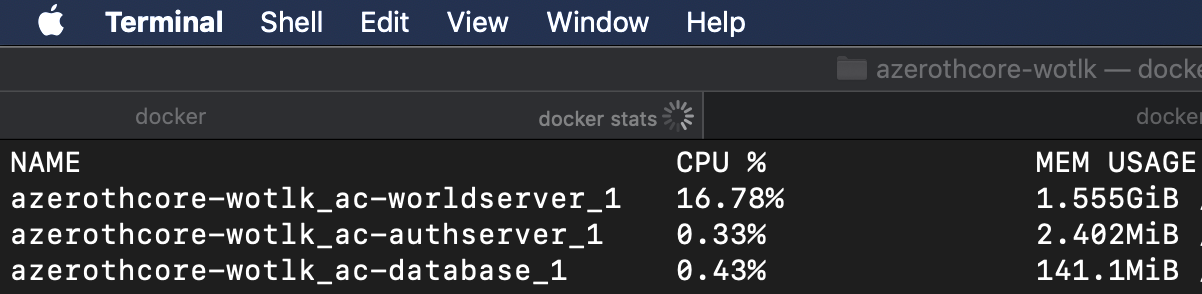 - -When used on GNU/Linux system, the amount of memory used by Docker is even less. - -#### Docker containers vs Virtual machines - -Using Docker will have the same benefits as using virtual machines, but with much less overhead: - - - ## Setup ### Software requirements @@ -113,7 +90,29 @@ Your server will be up and running shortly. To access your MySQL database we recommend clients like [HeidiSQL](https://www.heidisql.com/) (for Windows/Linux+Wine) or [SequelPro](https://www.sequelpro.com/) (for macOS). Use `root` as user and `127.0.0.1` as default host. The default password of the root DB user will be `password`. -#### Docker reference & support requests +### Memory usage + +The total amount of RAM when running all AzerothCore docker containers is **less than 2 GB** with no players online. + +This is an example of a fresh, empty AzerothCore server running with Docker on macOS: + + + +When used on GNU/Linux system, the amount of memory used by Docker is even less. + +### Docker containers vs Virtual machines + +Using Docker will have the same benefits as using virtual machines, but with much less overhead: + + + +_AzerothCore running on macOS with Docker_ + + +_AzerothCore running on Windows 10 with Docker_ + + +### Docker reference & support requests For server administrators, we recommend to read the [Docker documentation](https://docs.docker.com/) as well as the [Docker Compose reference](https://docs.docker.com/compose/reference/overview/). |