
diff options
| author | Kitzunu <24550914+Kitzunu@users.noreply.github.com> | 2021-05-25 14:19:26 +0200 |
|---|---|---|
| committer | GitHub <noreply@github.com> | 2021-05-25 14:19:26 +0200 |
| commit | ff1f1ed597fa624d33c1e323af50a5be799afe86 (patch) | |
| tree | ec3b2f27615c5cfbfc4ebf02cb7a78ff98b579f3 /docs | |
| parent | b654a0c7fbb7b0ea05ea580b347926b57ef8b9d3 (diff) | |
| download | wiki-ff1f1ed597fa624d33c1e323af50a5be799afe86.tar.gz wiki-ff1f1ed597fa624d33c1e323af50a5be799afe86.tar.bz2 wiki-ff1f1ed597fa624d33c1e323af50a5be799afe86.zip | |
chore(windows-requirement): Images (#502)
* chore(windows-requirement): Images
* try 75%
* try 60%
* back to 50%
* add link
* update image
* jpeg -> jpg
* rename
* target blank
* visual studio
* Update quest_poi_points.md
Diffstat (limited to 'docs')
| -rw-r--r-- | docs/quest_poi_points.md | 1 | ||||
| -rw-r--r-- | docs/windows-requirements.md | 11 |
2 files changed, 10 insertions, 2 deletions
diff --git a/docs/quest_poi_points.md b/docs/quest_poi_points.md index 33c8290..c7d6f88 100644 --- a/docs/quest_poi_points.md +++ b/docs/quest_poi_points.md @@ -50,6 +50,7 @@ Example quest: Secreat Communication. | 8318 | 3 | 7 | -6326 | -7 | 0 | **These points are all the little corners on the blue box. idx1 represents an area defined by the points of idx2 to draw the shape.** +  ### x diff --git a/docs/windows-requirements.md b/docs/windows-requirements.md index 451ef3d..1b4cd4b 100644 --- a/docs/windows-requirements.md +++ b/docs/windows-requirements.md @@ -14,6 +14,7 @@ | MS Visual Studio (Community) ≥ 16.4 (2019) (Desktop) (No preview) 1. Git Extensions + 1. You will need Git installed. You can get the latest version here https://git-scm.com/download/win 1. Install the compiler / IDE [Visual Studio (16) Community 2019](https://visualstudio.microsoft.com/downloads/) @@ -22,6 +23,10 @@ To do this, select **Desktop development for C++** under **Workloads -> Desktop & Mobile**. + <a href="../images/visualstudio.jpg" target="_blank"> + <img src="../images/visualstudio.jpg" height="50%" width="50%"> + </a> + 1. [MySQL Server Community Edition](https://dev.mysql.com/downloads/mysql/8.0.html) (**Use version ≥ 5.7** with mysql server configuration) 1. Download the Windows MSI Installer. @@ -95,9 +100,11 @@ 1. 32bit: https://sourceforge.net/projects/boost/files/boost-binaries/1.74.0/boost_1_74_0-msvc-14.2-32.exe/download - 1. Add an environment variable to "System" variable named "BOOST_ROOT" and as value your Boost installation directory, e.g `C:/local/boost_1_74_0`. Important is to use '/', not '\' when pointing to directory. (Make sure that it does not have a trailing slash (end of path). If you still get problems, add the same variable in the `USER` variables section too, like shown in the image below.) + 1. Add an environment variable to "System" variable named "BOOST_ROOT" and as value your Boost installation directory, e.g `E:/Programs/boost_1_74_0`. Important is to use '**/**', not '**\\**' when pointing to directory. (Make sure that it does not have a trailing slash (end of path). If you still get problems, add the same variable in the `USER` variables section too, like shown in the image below.) - 1. 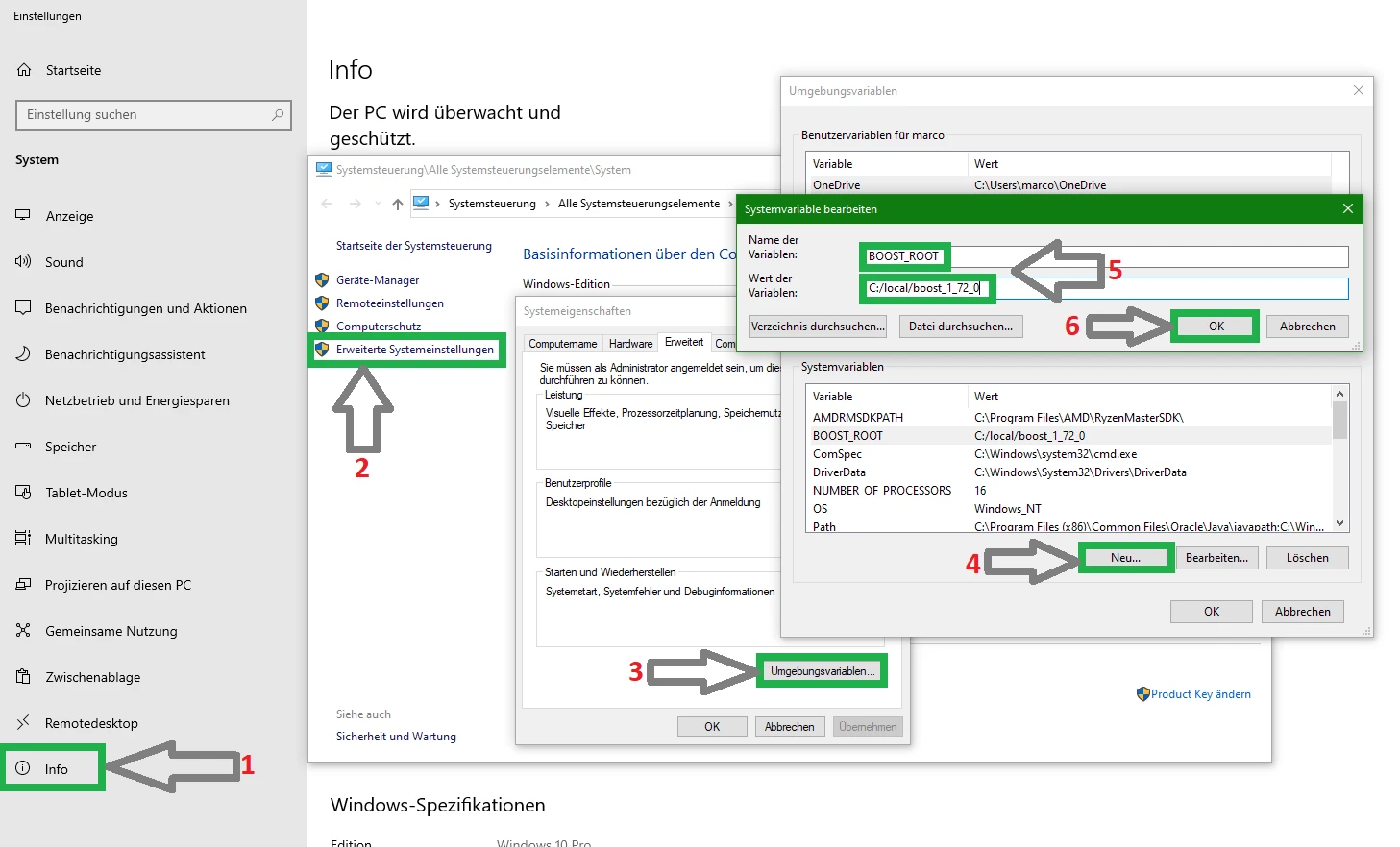 Copyright (C) TrinityCore + <a href="../images/boost.jpg" target="_blank"> + <img src="../images/boost.jpg" height="50%" width="50%"> + </a> 1. Notice that this image shows the version number `1.72.0` - use your actual version number in your settings. |