
diff options
Diffstat (limited to 'docs/windows-requirements.md')
| -rw-r--r-- | docs/windows-requirements.md | 17 |
1 files changed, 17 insertions, 0 deletions
diff --git a/docs/windows-requirements.md b/docs/windows-requirements.md index a49b686..ca20d75 100644 --- a/docs/windows-requirements.md +++ b/docs/windows-requirements.md @@ -7,6 +7,7 @@ | | | :- | +| Boost ≥ 1.70 - 1.74 | | MySQL ≥ 5.7.0 | | OpenSLL ≥ 1.0.x | | CMake ≥ 3.16 | @@ -82,7 +83,23 @@ 1. *Note #2: While installing OpenSSL, choose The OpenSSL binaries (/bin) directory (NOT "The Windows system directory")* *when given the choice on where to copy the OpenSSL DLLs. These DLLs will need to be located easily for [Core Installation](windows-core-installation).* + +1. [Boost](https://www.boost.org/). + 1. Download the prebuilt Windows Binary for Visual Studio 2019 + + 1. `1.70.0` is the minimum version required for Visual Studio 2019, but Version `1.74.0`is recommended + + 1. 64bit: https://sourceforge.net/projects/boost/files/boost-binaries/1.74.0/boost_1_74_0-msvc-14.2-64.exe/download + + 1. 32bit: https://sourceforge.net/projects/boost/files/boost-binaries/1.74.0/boost_1_74_0-msvc-14.2-32.exe/download + + 1. Add an environment variable to "System" variable named "BOOST_ROOT" and as value your Boost installation directory, e.g `C:/local/boost_1_74_0`. Important is to use '/', not '\' when pointing to directory. (Make sure that it does not have a trailing slash (end of path). If you still get problems, add the same variable in the `USER` variables section too, like shown in the image below.) + + 1. 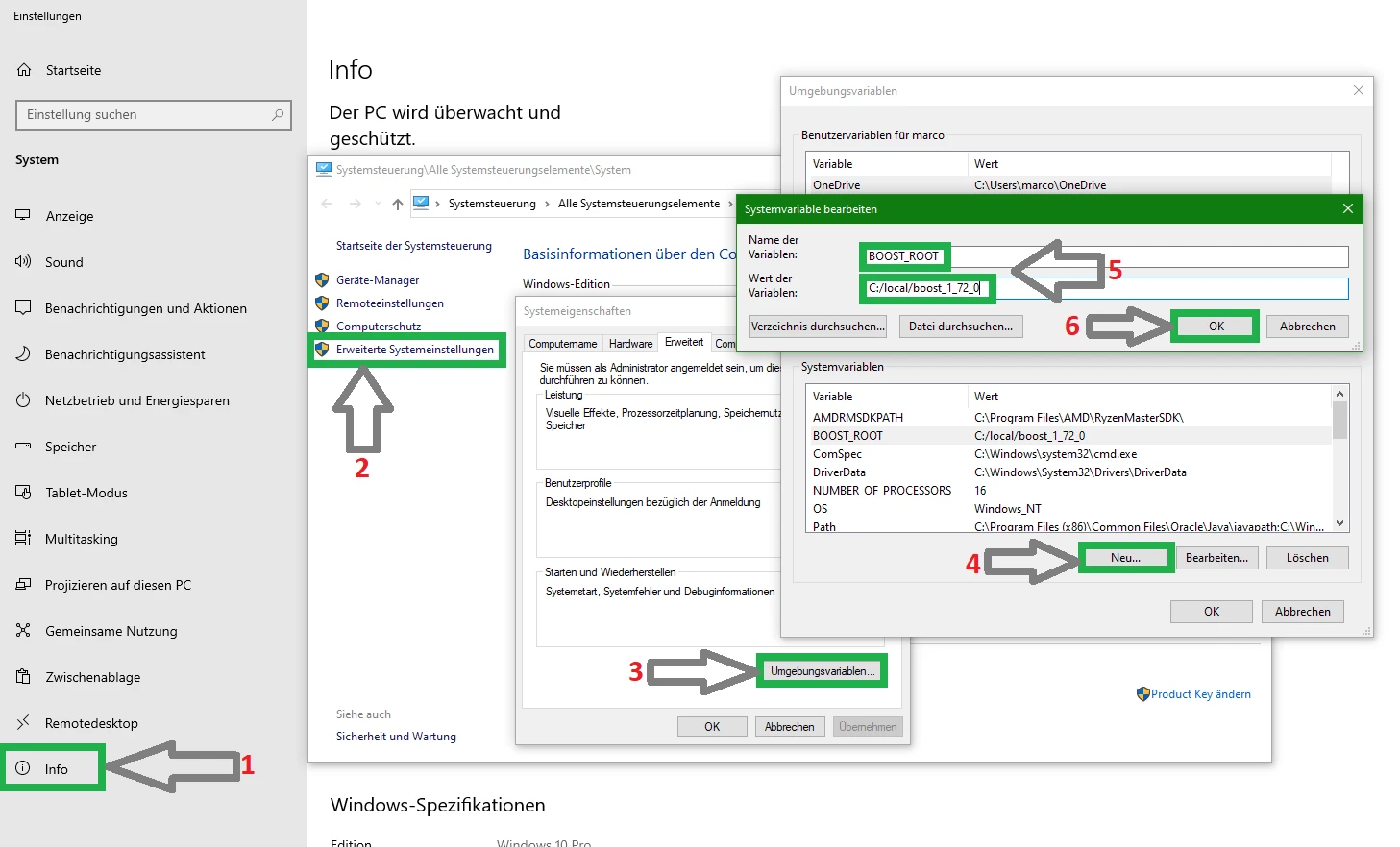 Copyright (C) TrinityCore + + 1. Notice that this image shows the version number `1.72.0` - use your actual version number in your settings. + <br> ## Help |