
diff options
Diffstat (limited to 'docs')
| -rw-r--r-- | docs/Install-with-Docker.md | 35 |
1 files changed, 35 insertions, 0 deletions
diff --git a/docs/Install-with-Docker.md b/docs/Install-with-Docker.md index 14eae7a..50444b9 100644 --- a/docs/Install-with-Docker.md +++ b/docs/Install-with-Docker.md @@ -112,10 +112,33 @@ SELECT * FROM realmlist; UPDATE realmlist SET address='<SERVER PUBLIC IP ADDRESS>'; ``` +### How to keep your AzerothCore updated with the latest changes + +First of all, you just need to use the `git` tool to update your repository by running the following common command: + +`git pull origin master` : this will download latest commits from the azerothcore repository + +Then you can just run the following command: + +`./acore.sh docker build`: to rebuild the sources and generating new binaries. Moreover, it will import latest database changes. + +NOTE: sometime you also need to recreate the docker images and re-download new version of the client data. We do not update the neither the Dockerfile nor the client data but +when it happens you can run the following commands: + +1. `docker-compose down` : it will delete the containers (not the volumes, so your data will be safe). +2. `docker-compose build`: it will rebuild your docker images based on the Dockerfile (normally it's automatically done by the `./acore.sh docker start:app/build` commands) +3. `./acore.sh client-data`: it will download the new version of the client data if there's a new version available + + ### How to run the worlserver with GDB +Running the server with GDB allows you to generate a crashdump if the server crashes. The crashdump file is useful for developers to understand which lines are failing and possibly fix it. + 1. Create a `config.sh` file under the `/conf/` directory of the azerothcore-wotlk repository 2. Add this configuration inside: `AC_RESTARTER_WITHGDB=true`. It will configure the restarter used by our docker services to use GDB instead of the binaries directly +3. Restart your containers and that's it! + +If the server crashes, you will find the crashdump file (`gdb.txt`) within the `/env/docker` folder ### How to use the dev-container @@ -139,6 +162,18 @@ To setup the Dev-Container follow these steps: Do not forget that you need to [Remote Container extension](https://marketplace.visualstudio.com/items?itemName=ms-vscode-remote.remote-containers) installed in your [Visual Studio Code](https://code.visualstudio.com/) IDE +#### How to debug your code with the dev-container + +Once inside the VSCode dev-container you can go to the debug session and use the `Linux/Docker debug` action as you can see in this image: + +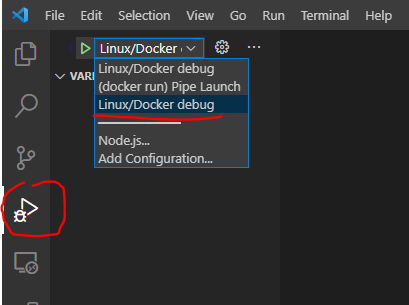 + +It will run a worldserver in debug mode and then you can start placing breakpoints in your code to debug it. + +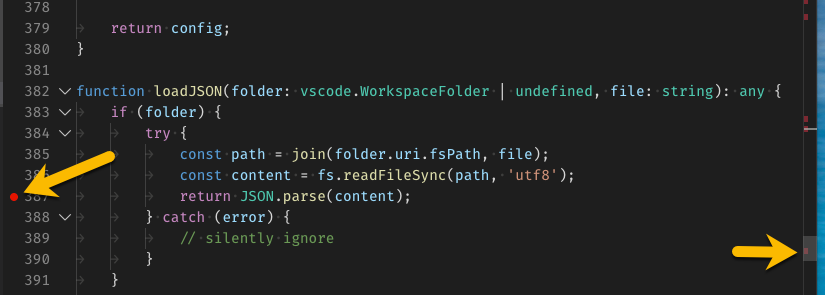 + +For more info about how to debug in vscode you can refer to the [official guide](https://code.visualstudio.com/docs/editor/debugging) + ### How to create a second realm with docker-compose To create a second realm we suggest you to take a look at the example available within the http://github.com/azerothcore/acore-docker repository. |