
diff options
Diffstat (limited to 'docs')
| -rw-r--r-- | docs/Install-with-Docker.md | 6 |
1 files changed, 6 insertions, 0 deletions
diff --git a/docs/Install-with-Docker.md b/docs/Install-with-Docker.md index 88b5840..cfe16b5 100644 --- a/docs/Install-with-Docker.md +++ b/docs/Install-with-Docker.md @@ -137,6 +137,10 @@ NOTE: sometime you also need to recreate the docker images and re-download new v Running the server with GDB allows you to generate a crashdump if the server crashes. The crashdump file is useful for developers to understand which lines are failing and possibly fix it. +**Keep in mind that you should compile your code with one of the following compilation types: Debug or RelWithDebInfo, otherwise GDB won't work properly** + +To enable GDB the steps are the following: + 1. Create a `config.sh` file under the `/conf/` directory of the azerothcore-wotlk repository 2. Add this configuration inside: `AC_RESTARTER_WITHGDB=true`. It will configure the restarter used by our docker services to use GDB instead of the binaries directly 3. Restart your containers and that's it! @@ -167,6 +171,8 @@ installed in your [Visual Studio Code](https://code.visualstudio.com/) IDE #### How to debug your code with the dev-container +NOTE: **Keep in mind that you should compile your code with the Debug mode, otherwise the debugger won't work properly** + Once inside the VSCode dev-container you can go to the debug session and use the `Linux/Docker debug` action as you can see in this image: 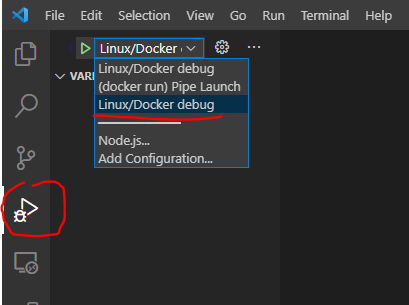 |