
diff options
Diffstat (limited to 'docs')
| -rw-r--r-- | docs/Contribute.md | 33 | ||||
| -rw-r--r-- | docs/How-to-create-a-PR.md | 207 |
2 files changed, 208 insertions, 32 deletions
diff --git a/docs/Contribute.md b/docs/Contribute.md index b7c4e34..3a87feb 100644 --- a/docs/Contribute.md +++ b/docs/Contribute.md @@ -41,38 +41,7 @@ If **(and only if)** the bug hasn't been reported yet, you can [open an issue](h ## How to create a Pull Request -Official GitHub tutorial [here](https://help.github.com/articles/creating-a-pull-request/). - -In order to create a Pull Request (PR), you have to fork the [AzerothCore repository](https://github.com/azerothcore/azerothcore-wotlk) (via your web browser, using the top-right Fork button) and clone your fork locally with `git clone https://github.com/YOUR_USERNAME/azerothcore-wotlk.git`. - -If you already have a local fork, remember to [sync it](Syncing-your-fork) before creating a new Pull Request to avoid conflicts. - -Open a terminal and move to your local clone of the fork, then create a new branch by typing: - -`git checkout -b my-branch` (Note: **my-branch** is an arbitrary name, choose whatever you want here) - -Now add your changes to the code. - -**IMPORTANT:** If you are going to add some database contents or structure changes, read [how to deal with SQL files](Dealing-with-SQL-files) first. - -Then you can commit your changes and push them: - -``` -## Select all your modified files -git add . -## Commit your changes (you can simply type "git commit -v" too) -git commit -v -m "Commit message here" -## origin = your git remote (the url of your fork) -git push origin my-branch -``` - -Now via web open your repository, switch to your new branch and click on _New pull request_ and compare our original repo/master branch with your fork/my-branch. - -**IMPORTANT:** remember to create **one separate PR for each feature/fix (use a separate branch for each PR)** - -### Describe the testing steps - -Please describe how other users should test your PR. This way people can easily check it and it will be faster to be merged. +- Read [How to test a PR](How-to-create-a-PR). ### Giving credit to the author of code diff --git a/docs/How-to-create-a-PR.md b/docs/How-to-create-a-PR.md new file mode 100644 index 0000000..56a6936 --- /dev/null +++ b/docs/How-to-create-a-PR.md @@ -0,0 +1,207 @@ +# How to create a PR + +### 1. Create a fork of AzerothCore + +You need to be signed on [github.com](https://github.com/). If you don't have an account yet, create one. + +Open the [AzerothCore repository](https://github.com/azerothcore/azerothcore-wotlk) +and create a fork of it by clicking in the top-right "Fork" button: + +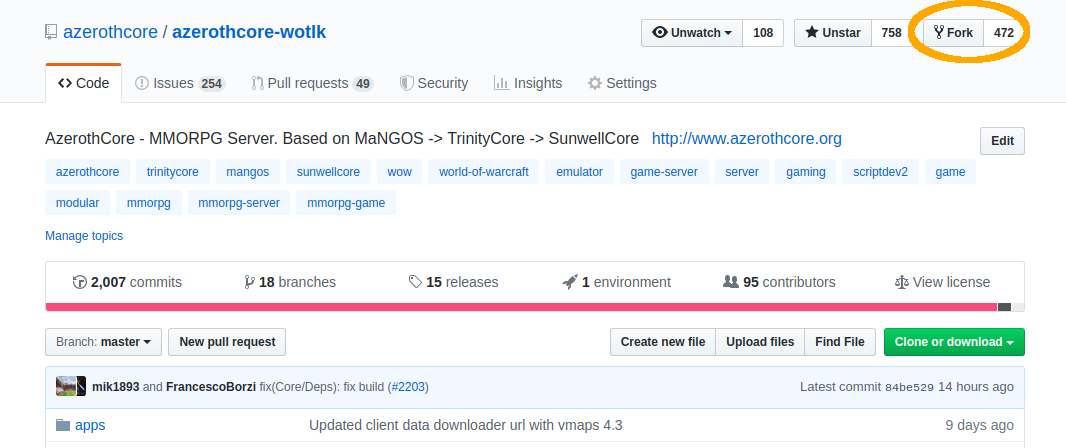 + + +### 2. Clone your fork to your local machine + +Once your fork is ready, you will see a screen showing **YourUsername/azerothcore-wotlk**. + +Click on the "Clone or download" button (on the right) and copy the https address of your fork: + +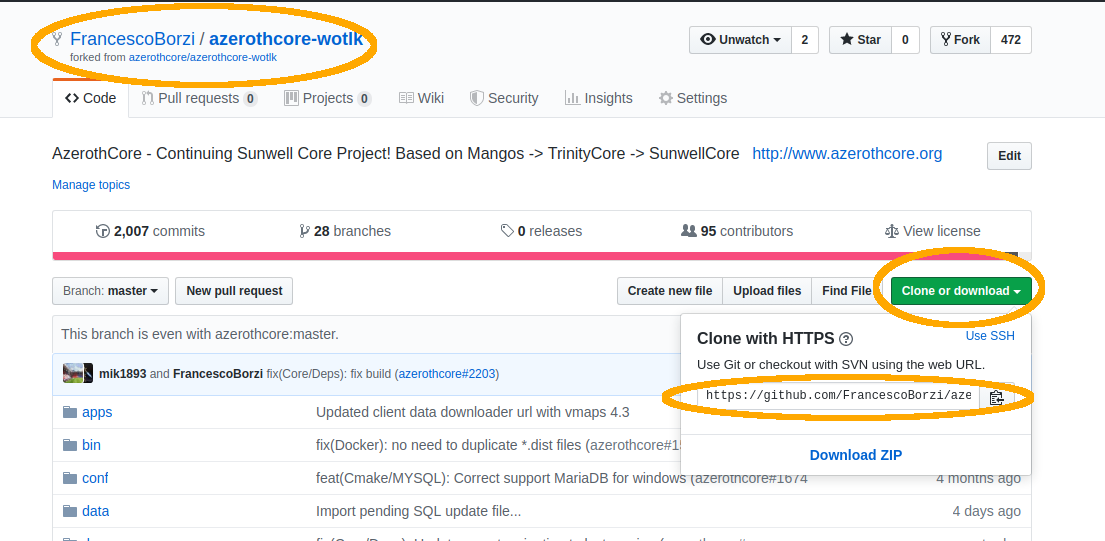 + +Now open the **terminal** (if you are on Windows, use the [git bash terminal](https://git-scm.com/downloads)) +and type `git clone ` followed by the git address of your fork that you just copied: + + + +``` +git clone https://github.com/YourUsername/azerothcore-wotlk.git +``` + +Wait until the download ends and then access the `azerothcore-wotlk` directory: + +``` +cd azerothcore-wotlk +``` + +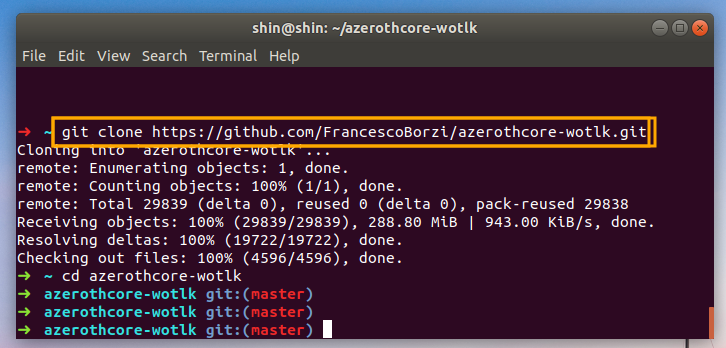 + + +### 3. Create a new branch + +**IMPORTANT:** never commit changes your `master` branch, it will make your fork messy. + +When creating a new branch, git will create a copy of your **current** branch. +Always make sure you are on `master` branch **before** creating a new branch by typing: + +``` + git checkout master +``` + +Create a new branch giving it a name that is different than any existing branch. + +You can give any name you want (replace "xxx" with whatever you are fixing): + +``` +git checkout -b fix-issue-xxxx +``` + + + + +### 4. Add your C++ changes (if any) + +If you don't have any C++ changes, you can skip this. Otherwise, open your editor and do them now! I'll wait... + +In this guide we will assume that you modified the file `instance_deadmines.cpp` + +Now add your file(s) to be committed: + +``` +git add src/server/scripts/EasternKingdoms/Deadmines/instance_deadmines.cpp +``` + +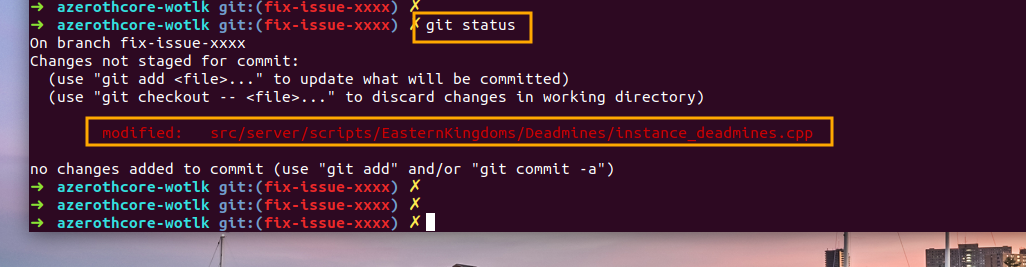 + +If you modified more files, just add them using `git add path/to/file` + +You can use the `git status` command to check which files have been selected to be committed: + + + + +### 5. Add your SQL changes (if any) + +If you don't have any SQL changes, you can skip this. Otherwise, run the following: + +``` +./data/sql/updates/pending_db_world/create_sql.sh +``` + +This will generate a new file located at `data/sql/updates/pending_db_world` +having a unique name that looks like `rev_XXXXXXXXXXXX.sql` + +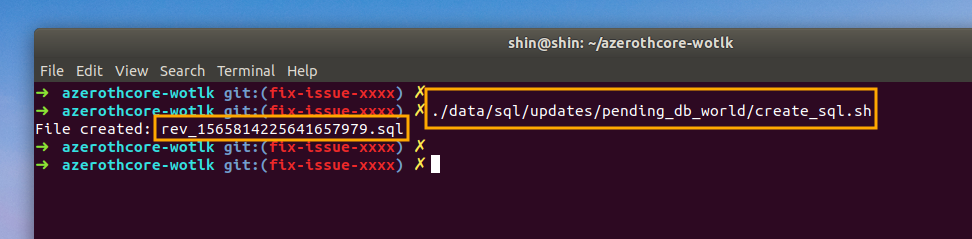 + +Open it with a text editor. You will notice that it contains some SQL code like: + +``` +INSERT INTO `version_db_world` (`sql_rev`) VALUES ('XXXXXXXXXXXX'); +``` + +Do NOT remove this line. Add your SQL code below and save it. + +Now add this file to be committed using the `git add path/to/file` command: + +``` +git add data/sql/updates/pending_db_world/rev_XXXXXXXXXXXX.sql +``` + +(of course replace `rev_XXXXXXXXXXXX.sql` with the actual name of the file) + +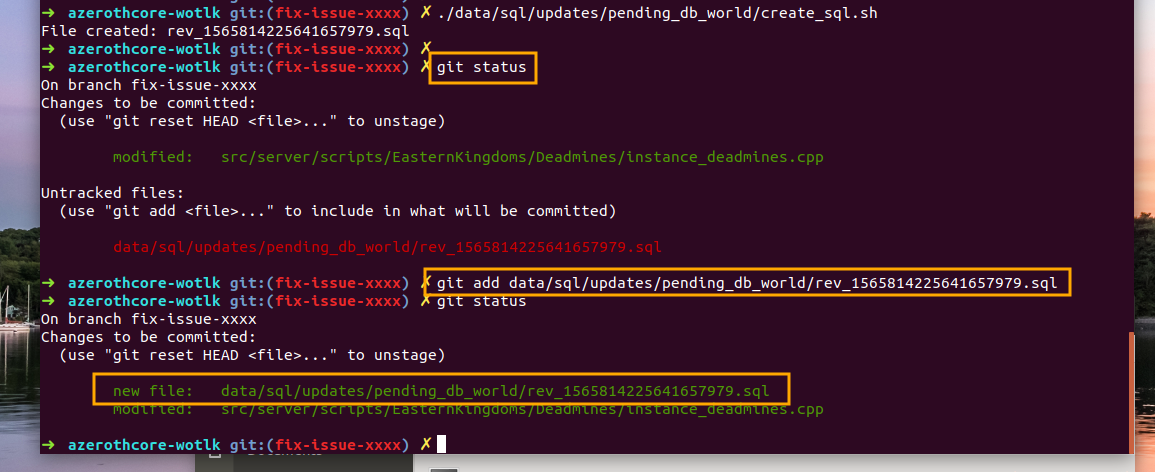 + +### 6. Commit & Push your changes + +First of all, commit your changes using: + +``` +git commit -m "fix: write a short commit message here" +``` + +Now it's time to push them remotely. +If you use the `git push` command for the first time in this branch, +git will ask to specify which remote branch you want to push to. + +So you should give: + +``` +git push ---set-upstream origin fix-issue-xxxx +``` + +(of course replace `fix-issue-xxxx` with the actual name of your branch) + +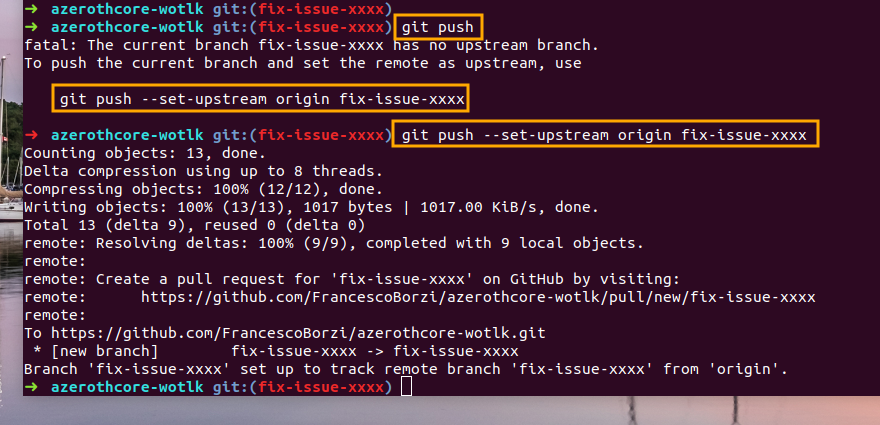 + + +### 7. Open the PR + +Go back to the [main AzerothCore repository](https://github.com/azerothcore/azerothcore-wotlk), +you will notice that GitHub is smart enough to realize that you are about to open a PR +and shows this nice light-yellow box: + +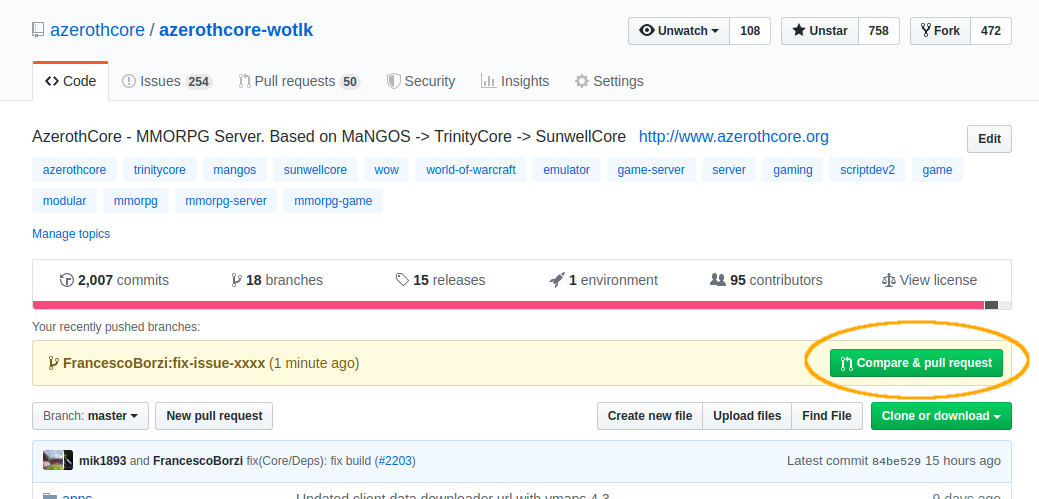 + +click on the "Compare & pull request" green button (located on the right). + +Now fill the PR template following the instructions that will appear in the screen, +do not forget to add the **testing instructions** so people can be able to test your PR and it can be merged: + +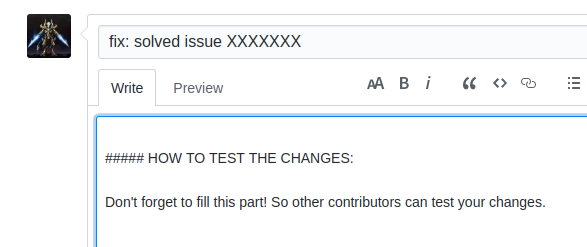 + +It's also a good practice to check the "File changes" tab to see that everything is in place as you expect: + + + +That's it! + +## FAQ + +### There is something wrong or missing in the file changes, I want to push more changes + +Just edit/add the files that you want, `git add` them, then commit & push again. +If you refresh your PR's page you will see the changes. + +### I've already created a PR, what should I do to create another one? + +Just repeat the procedure starting from the step 3. + +Be careful when creating a new branch: you **must** be in branch `master` first (type `git checkout master`). + +### Wow can I update my fork's master branch? + +If you never updated your fork before, type: + +``` +git remote add upstream https://github.com/azerothcore/azerothcore-wotlk.git +``` + +Then follow these steps: + +1) `git checkout master` +2) `git fetch upstream` +3) `git merge upstream/master` +4) `git push origin master` + +Your fork is now updated. + +### How can I update my branch with latest master? + +You have to update your fork's master branch first (see above). + +Then just `git checkout your-branch` and `git merge master`. + +### How much time does it take for my PR to be reviewed, tested and merged? + +This is an open source project and people work in their free time, so we cannot estimate it. + +What we can recommend is: write **clear** instructions to test your PR, so it will be easy for anyone to test it. + +If your test instructions are not clear or missing at all, +only advanced users will be able to test your PR and it will take much more time. + +### What terminal was used in this tutorial? + +https://github.com/robbyrussell/oh-my-zsh + +But any linux/mac terminal is ok too. +If you are so unlucky to be on windows, use [git bash](https://git-scm.com/downloads). |