
diff options
| author | Kargatum <dowlandtop@yandex.com> | 2021-05-23 19:00:39 +0700 |
|---|---|---|
| committer | GitHub <noreply@github.com> | 2021-05-23 14:00:39 +0200 |
| commit | f6441b4e8500b4659309b4da31254791245749b6 (patch) | |
| tree | 47b112a64953bfa46f4735dfe5676a610df7e9b8 /docs | |
| parent | 12dca7ca783947fae48c884f859fcc0642b7100a (diff) | |
| download | wiki-f6441b4e8500b4659309b4da31254791245749b6.tar.gz wiki-f6441b4e8500b4659309b4da31254791245749b6.tar.bz2 wiki-f6441b4e8500b4659309b4da31254791245749b6.zip | |
feat(Requirements/Boost): added boost support (#479)
* feat(Linux/Boost): added boost support
* Update windows-requirements.md
* Update macos-requirements.md
* Update windows-requirements.md
* Update windows-requirements.md
* Update windows-requirements.md
* Update docs/windows-requirements.md
Co-authored-by: Kitzunu <24550914+Kitzunu@users.noreply.github.com>
Co-authored-by: Kitzunu <24550914+Kitzunu@users.noreply.github.com>
Diffstat (limited to 'docs')
| -rw-r--r-- | docs/linux-requirements.md | 75 | ||||
| -rw-r--r-- | docs/macos-requirements.md | 4 | ||||
| -rw-r--r-- | docs/windows-requirements.md | 17 |
3 files changed, 29 insertions, 67 deletions
diff --git a/docs/linux-requirements.md b/docs/linux-requirements.md index 6432d1f..59c410e 100644 --- a/docs/linux-requirements.md +++ b/docs/linux-requirements.md @@ -8,97 +8,42 @@ | | | :- | | MySQL ≥ 5.7.0 | +| Boost ≥ 1.67 | | CMake ≥ 3.16 | | Clang ≥ [7](https://github.com/azerothcore/azerothcore-wotlk/actions?query=workflow%3Acore-build) | #### Ubuntu with MariaDB 10.x ```sh -sudo apt update && sudo apt full-upgrade -y && sudo apt install git cmake make gcc g++ clang libssl-dev libbz2-dev libreadline-dev libncurses-dev libace-6.* libace-dev mariadb-server mariadb-client libmariadb-dev libmariadbclient-dev libmariadb-dev-compat +sudo apt update && sudo apt full-upgrade -y && sudo apt install git cmake make gcc g++ clang libssl-dev libbz2-dev libreadline-dev libncurses-dev libace-6.* libace-dev libboost-all-dev mariadb-server mariadb-client libmariadb-dev libmariadbclient-dev libmariadb-dev-compat ``` #### Ubuntu with MySQL 8.x ```sh -sudo apt-get update && sudo apt-get install git cmake make gcc g++ clang libmysqlclient-dev libssl-dev libbz2-dev libreadline-dev libncurses-dev mysql-server libace-6.* libace-dev +sudo apt-get update && sudo apt-get install git cmake make gcc g++ clang libmysqlclient-dev libssl-dev libbz2-dev libreadline-dev libncurses-dev mysql-server libace-6.* libboost-all-dev libace-dev ``` Remember that if you are using the `root` user, it is not necessary to use `sudo`. To configure MySQL in Ubuntu 18.04 and similar (set `root` password and other settings) read [this guide](https://www.digitalocean.com/community/tutorials/how-to-install-mysql-on-ubuntu-18-04). -**Note**: in older versions of Ubuntu like **18.04** you need to install gcc 10: +**Note**: in older versions of Ubuntu like **18.04** you need to install `gcc-10` and `libboost1.74-dev`: ``` -sudo add-apt-repository ppa:ubuntu-toolchain-r/test +sudo add-apt-repository -y ppa:ubuntu-toolchain-r/test +sudo add-apt-repository -y ppa:mhier/libboost-latest sudo apt-get update -sudo apt install gcc-10 g++-10 +sudo apt install -y gcc-10 g++-10 +sudo apt install -y install libboost1.74-dev ``` --- -#### Debian 8 - -```sh -sudo apt-get update && sudo apt-get install git make gcc g++ clang libmysqlclient-dev libssl1.0-dev libbz2-dev libreadline-dev libncurses-dev mysql-server libace-6.* libace-dev -``` - -Remember that if you are using the `root` user, it is not necessary to use `sudo`. - -#### Install last cmake version on Debian 8 - -To install last version of cmake use: - -```sh -sudo apt install python3-pip -pip3 install --upgrade cmake -``` - -If you are using the `root` user - -```sh -apt install python3-pip -pip3 install --upgrade cmake -``` - -Than **reboot** to sync the bash and use cmake from the terminal, than type the followings commands to check the cmake version: - -```sh -cmake --version -``` - -You should have a version **>= 3.16**. - -Continue below the guide to install the other installation requirements. - -**Troubleshooting (cmake install)**: if you get any errors like: `No module named 'skbuild'`, you can solve with this: - -```sh -apt install python3-pip -pip3 install scikit-build -pip3 install --upgrade pip -pip3 install cmake -``` - ---- - -#### Debian 9 - -```sh -sudo apt-get update && sudo apt-get install git cmake make gcc g++ clang default-libmysqlclient-dev libssl1.0-dev libbz2-dev libreadline-dev libncurses-dev mysql-server libace-6.* libace-dev -``` - -Remember that if you are using the `root` user, it is not necessary to use `sudo`. - -You might need to add the stretch-backports repositories to APT in order to install clang-6.x+ and cmake v3.8+. -If you do not succeed installing cmake you can use the package manager of python3 (pip3) - ---- - #### Debian 10 ```sh -sudo apt-get update && sudo apt-get install git cmake make gcc g++ clang default-libmysqlclient-dev libssl-dev libbz2-dev libreadline-dev libncurses-dev mariadb-server libace-6.* libace-dev +sudo apt-get update && sudo apt-get install git cmake make gcc g++ clang default-libmysqlclient-dev libssl-dev libbz2-dev libreadline-dev libncurses-dev mariadb-server libace-6.* libace-dev libboost-all-dev ``` Remember that if you are using the `root` user, it is not necessary to use `sudo`. @@ -156,7 +101,7 @@ you can install gcc-8: sudo apt-get install g++-8 gcc-8 ``` -<br> +--- ## Help diff --git a/docs/macos-requirements.md b/docs/macos-requirements.md index 379d1da..43f649e 100644 --- a/docs/macos-requirements.md +++ b/docs/macos-requirements.md @@ -7,10 +7,10 @@ | | | :- | +| Boost ≥ 1.70 | | MySQL ≥ 5.7.0 | | CMake ≥ 3.16 | - - Install XCode using the App Store, then open the terminal and type: ```sh @@ -26,7 +26,7 @@ brew update ``` ```sh -brew install openssl readline cmake ace coreutils bash bash-completion coreutils +brew install openssl readline cmake ace boost coreutils bash bash-completion coreutils ``` This will install bash 5+, you might need to restart your terminal. diff --git a/docs/windows-requirements.md b/docs/windows-requirements.md index a49b686..ca20d75 100644 --- a/docs/windows-requirements.md +++ b/docs/windows-requirements.md @@ -7,6 +7,7 @@ | | | :- | +| Boost ≥ 1.70 - 1.74 | | MySQL ≥ 5.7.0 | | OpenSLL ≥ 1.0.x | | CMake ≥ 3.16 | @@ -82,7 +83,23 @@ 1. *Note #2: While installing OpenSSL, choose The OpenSSL binaries (/bin) directory (NOT "The Windows system directory")* *when given the choice on where to copy the OpenSSL DLLs. These DLLs will need to be located easily for [Core Installation](windows-core-installation).* + +1. [Boost](https://www.boost.org/). + 1. Download the prebuilt Windows Binary for Visual Studio 2019 + + 1. `1.70.0` is the minimum version required for Visual Studio 2019, but Version `1.74.0`is recommended + + 1. 64bit: https://sourceforge.net/projects/boost/files/boost-binaries/1.74.0/boost_1_74_0-msvc-14.2-64.exe/download + + 1. 32bit: https://sourceforge.net/projects/boost/files/boost-binaries/1.74.0/boost_1_74_0-msvc-14.2-32.exe/download + + 1. Add an environment variable to "System" variable named "BOOST_ROOT" and as value your Boost installation directory, e.g `C:/local/boost_1_74_0`. Important is to use '/', not '\' when pointing to directory. (Make sure that it does not have a trailing slash (end of path). If you still get problems, add the same variable in the `USER` variables section too, like shown in the image below.) + + 1. 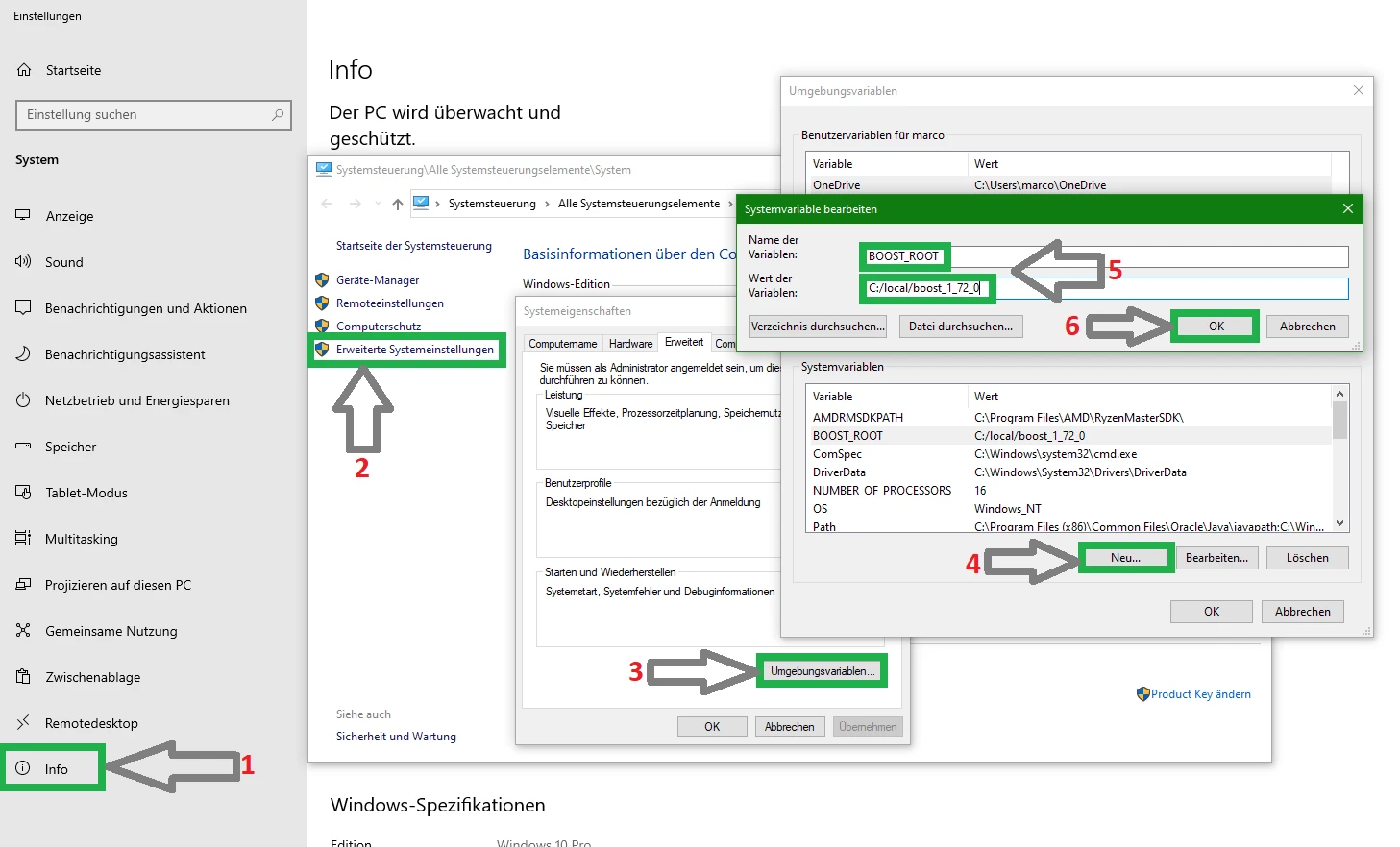 Copyright (C) TrinityCore + + 1. Notice that this image shows the version number `1.72.0` - use your actual version number in your settings. + <br> ## Help |